
Script functions

Functions enable actions in scripts that cannot be performed using SQL.
Some functions return a value that can be stored in a variable or used directly.
Table of Contents
Context functions
contextAction()
Execute a UI button action (button click) or focus a UI object.
contextAction(buttonName); -- Perform button click
contextAction(objectName); -- Focus other objects
contextAction(tableName); -- Focus master or child grids
contextGetValue()
Get value of a UI object.
var1=contextGetValue(objectName,property); -- For buttons
var2=contextGetValue(tableName,fieldName); -- For grids
var3=contextGetValue(objectName); -- For other objects
objectName is shown in tooltip in modification mode.
property : 'enabled' (or empty) / 'visible' / 'checked'
contextSetValue()
Set value for a UI object.
contextSetValue(objectName,value,property); -- For buttons
contextSetValue(tableName,value,fieldName); -- For grids
contextSetValue(objectName,value); -- For other objects
objectName is shown in tooltip in modification mode.
property : 'enabled' (or empty) / 'visible' / 'checked'
format()
var1='Date is '||format(Date);
returned value : local display format.
Date : SQLite date format. Ex: '2026-01-01'.
getFileContent()
Get file content from a local file or URL.
blobVar1=getFileContent(filePath);
getVarValue()
Retreive var value from var literal name.
var1='coucou';
var2=getVarValue('var1');
iif()
var1=iif(Condition,valIfTrue,ValIfFalse);
parseFile()
parseFile(FilePath or URLPath,format,varNamePrefix[,key1[,key2[...]]]);format : json (only supported format at this time).
varNamePrefix : prefix for variable name where to store the file data.
If empty, 'json' is used.
keyN : key to retreive in file. Il empty, all key are stored in variables.
The data in the file is stored in variables named as follows:
varNamePrefix + "_" + json level 1 key + "_" + json level 2 key ...
If key is an array, variables named are :
varNamePrefix + "_" + json level 1 key + "_" + counter + "_" + json level 2 array key ...
First json level is ignored for var names if varNamePrefix ends with '*'. Usefull if 1rst level key is unknown or not constant.
parseFile('https://openlibrary.org/api/...','OL','json*');

After parsing, variables are :
OL_url
OL_key
OL_title
OL_subtitle
OL_authors_000_url
OL_authors_000_name
OL_authors_001_url
OL_authors_001_name
refreshLaunchers()
Refresh the main menu and application buttons.
refreshLaunchers();tr()
tr(textToTranslate[,arg1[,arg2...]]);returned value : translated phrase in language selected by user.
textToTranslate : constant text containing '%<n>' anchors for arguments location.
arg<n> : not constant value.
In modification mode, this function create the translation keys (textToTranslate) in the translation tables.
System functions
If function fails, error is stored in sysLastError variable and the script execution continue.
sysCmd()
Command run :
Linux : /bin/sh {-c,...}
Windows : cmd {/C,...}
var1=sysCmd(cmd[,timeout]);
timeout : in milliseconds. FADAcore waits for end of the process. If timeout occurs before process ends, result is -2.
If timeout value is missing or <=0, cmd isn't attached to FADAcore, FADAcore can't catch the result of cmd and cmd can continue after FADAcore stops.
returned value :
-3 = cmd errors before timeout (if timeout value is specified) or before 1000ms (if timeout value is NOT specified)
-2 = timeout when cmd is still running (if timeout value is specified)
-1 = cmd not started
0 = cmd started and still running (if timeout value is NOT specified)
If timeout value is specified and cmd ends before timeout value, returned value is cmd exit code.
If timeout value is NOT specified and cmd ends before 1000ms, returned value is cmd exit code.
sysOpen()
Open an external file.
var1=sysOpen(fileName);
returned value :
-3 = no read permission
-2 = file doesn't exist
-1 = not started
1 = file opened (read write)
2 = file opened (read only)
sysRun()
Run an external program
var1=sysRun(program[,args[,timeout]]);
args : arguments for program, "|" separated.
timeout : in milliseconds. FADAcore waits for end of the process. If timeout occurs before process ends, result is -2.
If timeout value is missing or <=0, program isn't attached to FADAcore, FADAcore can't catch the result of program and program can continue after FADAcore stops.
returned value :
-3 = program errors before timeout (if timeout value is specified) or before 1000ms (if timeout value is NOT specified)
-2 = timeout when program is still running (if timeout value is specified)
-1 = program not started
0 = program started and still running (if timeout value is NOT specified)
If timeout value is specified and program ends before timeout value, returned value is program exit code.
If timeout value is NOT specified and program ends before 1000ms, returned value is program exit code.
Developper functions
A script becomes a function if parameters are defined for it (func_params column).
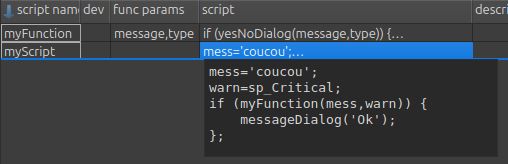
In function script parameters behaves like variable.
Function result is the returned value.
if (yesNoDialog(message,type)) {
    return true;
} else {
    return false;
}
Calling script variables are not accessible to the called functions.