
Installation (en)
1rst installation
Linux
- Download the installer (.run).
- If necessary, make the file executable by changing its permissions (right-click > Properties).
- Run the installer; you may need the administrator password to install the xcb libraries.
- Installing it in your home directory will allow FADAcore to download and install its own updates.
- A launcher is created in the main menu, under the “Other” category.
- First launch.
Windows
- Download the installer (.exe).
- Windows may rename the installer file so that it cannot be run. If so, you’ll need to rename it with an .exe extension. For example, FadaInstall.exe.
- Run the installer; all necessary libraries are installed in the installation folder (no system changes).
- First launch.
Updates
Updates to FADAcore and updates to FADA applications are separate.
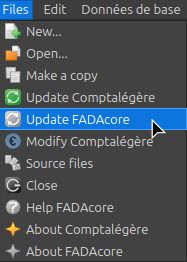
- First, update FADAcore.
- Then, update your FADA applications.
They can be launched directly from FADAcore:
Every FADA application requires a minimum version of FADAcore (one that isn't too old).
FADAcore (version 2.0.0 and later) can run all FADA applications (older ones may work only partially, in which case they need to be updated).
Versions
FADAcore version M.Db.m
- M : major version
- Db : FADA tables schema version
- m : minor version
You can update FADAcore as long as the major version remains the same:
- M.Db.# to M.Db.# : there's no need to update the FADA apps.
- M.#.# to M.#.# : it is best to then update the FADA applications from the new version of FADAcore.
- #.#.# to #.#.# : update is not possible, uninstall FADAcore and perform a clean reinstallation. Your FADA applications will not be affected, but you may need to update them using the new version of FADAcore.